The Advantage of Using OctaMeet Instead of Zoom
In an era of remote working, choosing the right video conferencing tool is crucial for team productivity. Many businesses discover different needs over time during their digital meeting journey, often starting with Zoom.
OctaMeet comprehensively meets all enterprise requirements in various areas, such as stronger data security and AI-supported meeting summaries, as well as offering more flexible pricing.
What is OctaMeet?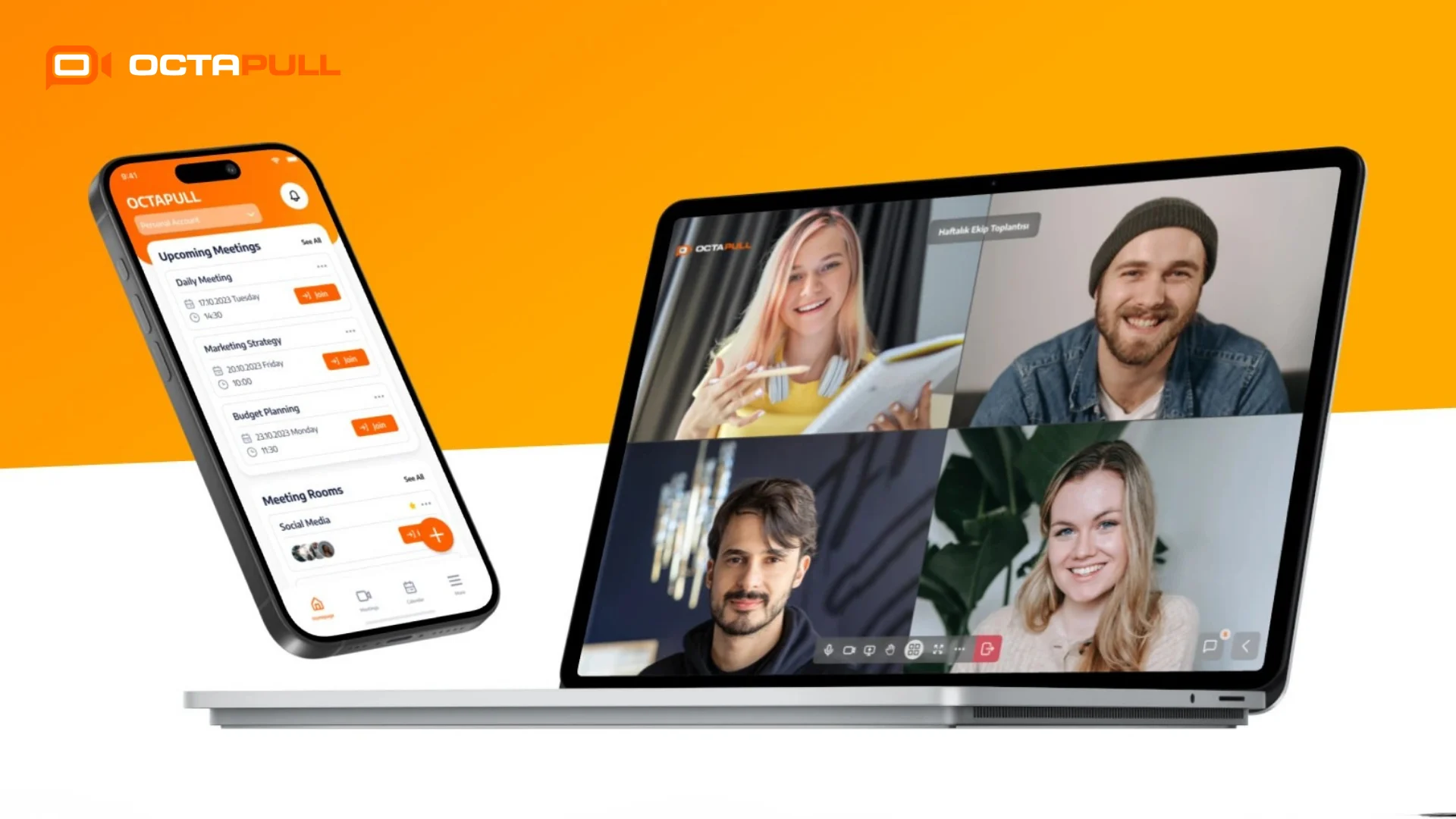
It is a domestic video conferencing and online meeting application developed by OCTAPULL. The platform appeals to a wide user base, ranging from individuals to corporate teams.
It stands out thanks to features such as AI-supported meeting summaries, secure cloud storage and multi-platform access. It manages the entire meeting cycle, from planning to action item tracking, all in one place, and integrates seamlessly with the OCTAPULL ecosystem. This offers businesses an integrated digital work environment.
Core Features of OctaMeet
OctaMeet's feature set covers a wide range, from AI tools that enhance meeting productivity to corporate security infrastructure. AI-supported meeting summaries and action item tracking are among the platform's most notable capabilities.
Other significant functionalities include live captions, meeting note-taking, screen sharing, file sharing, calendar integration, end-to-end encryption and on-premises installation options.
Use Cases
OctaMeet is designed to address the needs of remote and hybrid working models, as well as corporate meetings. Multi-departmental businesses can create meeting rooms to strengthen internal team collaboration.
Educational institutions can organise webinars for up to 300 people. Sectors processing sensitive data, such as healthcare, finance and public services, can ensure full legal compliance by keeping all data on their own servers through on-premises installation.
Common İssues With Zoom
Although Zoom meets the basic needs of video conferencing, it has structural issues that complicate post-meeting workflows, tool integration and budget management for growing teams.
Loss of Post-Meeting Notes and Action Items
Following internal company meetings, it can sometimes be unclear to participants what decisions have been made and what tasks and responsibilities have been assigned.
Zoom’s AI-powered meeting summary feature, AI Companion, only generates a meeting summary if the host initiates it, and the host also manages sharing preferences.
The current structure does not guarantee that meeting notes and action items are automatically distributed to the entire team. Consequently, untracked tasks, repeated meetings, and lost decisions can hinder organisational meeting efficiency.
Tool Fragmentation
Zoom is a powerful video conferencing tool. However, separate applications are required for pre-meeting planning, instant messaging, file management, and project tracking.
Teams are typically forced to use Zoom for meetings, a different app for notes, and a separate platform for file sharing. This fragmentation of tools can lead to loss of context and unnecessary switching between apps.
Moreover, this issue can become even more pronounced in a hybrid working model, when team members in different locations try to access the same information through different channels.
Cost and Licensing Complexity
Zoom's pricing structure, which involves separate fees for the basic plan, add-on modules and advanced features, makes it particularly challenging for mid-sized businesses to track their budget.
For instance, the webinar module, large meeting capacity, and advanced security options are not included in the standard plan. Therefore, additional licences must be purchased for these features.
As a team grows, the total licensing cost can rise rapidly while the range of features obtained may fall short of expectations. This is the main reason why those seeking affordable video conferencing solutions opt for Zoom alternatives like OctaMeet instead.
The Benefits of OctaMeet
OctaMeet offers a more integrated enterprise meeting solution than Zoom, with AI-powered meeting management, robust data security and multi-platform support.
AI-Powered Meeting Summary
OctaMeet’s AI-powered meeting summary automatically summarises the content discussed at the end of the meeting and sends the summary to all participants. Moreover, the process is entirely automated, requiring no host intervention.
The generated summary is not just a general text. It clearly outlines action items, assignees, and deadlines in a structured format. This ensures that no task arising from the meeting goes untracked.
Consider, for example, an intensive planning meeting with community members for an upcoming large-scale careers event.
As soon as the meeting ends, critical tasks such as which company will be contacted by whom, and when logistical details will be resolved are automatically delivered to your team’s inbox in a structured format, with no extra effort required.
Who sees the meeting summary? The meeting organiser and all participants receive the summary via email. This ensures that team members who cannot attend are immediately informed of the decisions and action items.
AI-Powered Meeting Agenda, Items, and Note-Taking
Thanks to the agenda creation feature, agenda items are prepared with AI support and shared with participants before the meeting begins. This ensures that everyone knows what will be discussed before the meeting even starts.
During the meeting, the live captioning and automatic note-taking features activate. Participants can focus on the meeting instead of taking notes, while the transcript continues to be generated in the background.
At the end of the meeting, the AI analyzes the previous meeting's outcomes and suggests agenda items for the next meeting. This way, teams won't have to spend time preparing an agenda each week.
For example, let’s say you’re holding a technical brainstorming session with your team to develop a new AI application. While you focus on the application architecture and coding logic, the system transcribes all the technical details and decisions discussed.
How are action items generated? The AI automatically creates a list of the “who, what, and when” by analyzing the conversation content. After the meeting, this list is sent via email to all participants.
Advanced Security Features
OctaMeet elevates meeting security to enterprise standards with end-to-end encryption and two-factor authentication. The platform prevents all risks of unauthorized access and data leaks.
All OctaMeet meeting and user data is stored on Turkish servers. This ensures compliance with the KVKK, eliminating the need for businesses to implement additional configurations.
For companies conducting interviews with candidates, keeping candidates’ personal data and interview recordings within Turkey rather than transferring them abroad provides significant legal assurance.
Additionally, an on-premises deployment option is available for high-security sectors, such as finance, healthcare, and public services. With this option, since data is stored on the organization’s infrastructure, external risks are eliminated entirely.
Multi-Platform Support
OctaMeet operates seamlessly across desktops, tablets, mobiles, and web browsers. Team members can easily join meetings, no matter what device they use.
Additionally, the infrastructure supports HD video streaming, even with a weak internet connection, ensuring a reliable online meeting experience for mobile employees. Connection quality does not hinder meeting productivity.
For instance, if you need to join an urgent meeting on your phone while traveling from campus or the office to your home, you won't experience any audio or video dropouts, even if your mobile data signal weakens.
How to Use OctaMeet?
You don't need extensive technical knowledge to get started. Every step, from creating an account to tracking post-meeting actions, can easily be completed through the intuitive interface.
Creating an Account
Signing up for OctaMeet takes just a few minutes. You can create your account easily via the OCTAPULL website or mobile app.
Once your account is activated, you can start using the platform after entering your personal preferences and team information. You can also instantly start your 30-day free trial to experience the licensed version.
Creating a Meeting
Once the account setup is complete, the entire meeting creation process is managed through a single screen.
After setting up the meeting name, date, and participants, invitations are automatically sent via calendar integration with Outlook, Google Calendar, or iCalendar. You can also create recurring meeting rooms for routine team meetings. This way, you can avoid sharing the same link each time.
Usage During the Meeting
Once the meeting begins, you can enable screen sharing, file sharing, and interactive whiteboard with a single click.
The live captioning feature activates automatically and begins transcribing conversations into text in real time. This allows participants to focus on the content rather than taking notes while the AI generates a transcript throughout the meeting.
Sharing the Post-Meeting Summary and Tracking Actions
When the meeting ends, an AI-powered summary is automatically generated and sent to all participants via email. This summary is more than just general text; it is a structured document containing action items, assignees, and proposed agenda items.
OctaMeet Pricing
OctaMeet offers three licensing options: Free, Individual, and Enterprise. Each plan is designed to meet different usage needs and provides an affordable, flexible video conferencing solution.
OctaMeet’s tiered licensing structure addresses every need, from individual users to large-scale corporate teams. Unlike Zoom, which charges extra for additional modules, OctaMeet clearly defines the features included in each plan.
Which Plan Is Right for You?
The free plan is ideal for individuals looking to meet basic meeting needs. It features screen sharing, an interactive whiteboard, calendar integration, and unlimited one-on-one calls.
However, since group meetings are limited to one hour, this plan is best for users with heavy meeting traffic as a starting point.
The Individual plan is ideal for freelancers and independent professionals requiring advanced features, such as AI-powered meeting summaries, live captions, meeting recording, cloud storage, and a webinar module.
The enterprise plan is designed for teams that require workspace integration, on-premises installation, design customization, and technical support.
It is the optimal enterprise meeting solution for financial, healthcare, and public sector organizations that prioritize data security and GDPR compliance.
OctaMeet and Zoom Feature Comparison
| Feature | OctaMeet | Zoom |
|---|---|---|
| Video and Audio Quality | Maintains HD quality even in low connections. | Good in high connections; freezing and quality losses may occur in low connections. |
| Ease of Use | Requires no training. Features an intuitive and user-friendly interface. | Although user-friendly adaptation processes may be required for new users. |
| Artificial Intelligence Meeting Summary | Automatic summaries, action items, and agenda suggestions are transmitted to all participants. | AI Companion feature operates only when initiated by the host. Sharing options depend on host preferences. |
| Meeting Notes and Subtitles | Live subtitles and automatic notetaking are available. Transcripts are shared at the end of meetings. | Live subtitles are available. Automatic note-taking features remain restricted. |
| Screen Sharing | Full screen or application window sharing is possible. Recordings can be saved to cloud storage. | Full screen and application window sharing are possible. |
| File Sharing | Allows rapid file sharing during meetings and within the application. | Basic chat features are available, yet file sharing remains restricted. |
| Calendar Integration | Features seamless integration with Outlook, Google Calendar and iCalendar. | Provides integration with applications used by teams. |
| Security | Features end-to-end encryption, Turkey servers, KVKK compliance and on-premises options. | End-to-end encryption is available. However local server support is absent for users in Turkey. |
| Collaboration Tools | Ensures powerful collaboration through whiteboards, chats, screens and file sharing. | Offers restricted collaboration support via remote control. |
| Mobile Application | iOS and Android applications are available. Operates via browsers without requiring additional installations. | iOS and Android applications are available. |
| Pricing | Includes free plans, individual plans, and corporate plans. Offers a 30-day fully featured trial version to new users. | Involves separate pricing for additional modules. Feature and time restrictions exist in demo versions. |
AI Meeting Summary Security and Best Practices
AI-powered meeting summaries are a powerful productivity tool. However, implementing them without first establishing proper usage practices can pose risks to data security and participant trust.
Checklist for Sharing Summaries
Who the meeting summary will be shared with must be clearly defined in advance. Sharing the summary only with relevant participants prevents uncontrolled dissemination of sensitive business information.
For example, customize the distribution list based on the meeting type to include all participants, only decision-makers, or specific departments.
Additionally, the meeting host should briefly review the accuracy of the action items in the summary. Although AI outputs may correctly interpret the context, final approval must remain under human control.
Participant Notification and Transparency
Participants must be informed before the meeting begins that the session will be recorded and summarized by AI. This transparency meets legal obligations and ensures that participants can engage in the process with confidence.
Although OctaMeet’s infrastructure, operating on servers in Turkey, supports compliance with the KVKK, organizations are encouraged to maintain up-to-date data processing policies.
Is OctaMeet Free?
The free plan includes screen sharing, an interactive whiteboard, calendar integration, and unlimited one-on-one calls. However, group meetings are limited to one hour.
The Individual plan is recommended for advanced features such as AI summaries and meeting recordings. Plus, the Individual plan offers a 30-day free trial, so you can test all features in full.
Which Devices Is It Compatible With?
OctaMeet runs as a native app on Windows, macOS, iOS, and Android. You can also join meetings via modern web browsers without installing any apps.
What Is the Difference Between Zoom’s AI Meeting Summary and OctaMeet’s AI Summary?
Zoom’s AI Companion feature only generates a meeting summary if the host initiates it. Additionally, the host manages sharing preferences.
In contrast, OctaMeet’s AI summary operates automatically, without requiring host intervention, and is sent directly to all participants. The quality of the summary from both tools depends on the content of the meeting.
Who Receives the Meeting Summary?
The meeting host and all participants receive the summary via email. The sharing list can be customized based on the meeting type. This ensures that sensitive content is shared only with relevant individuals and maintains user control.
Conclusion
In terms of meeting efficiency, data security, and cost management, OctaMeet is a better choice than Zoom for both corporate and individual users.
AI-powered meeting summaries, automatic action item tracking, a KVKK-compliant secure infrastructure, and flexible pricing options also position OctaMeet as a strong alternative to Zoom.
Get started right away with the free plan, try all Individual plan features for 30 days at no cost, or contact our team about your business needs.